
How Healthcare Facilities Can Attract More Patients Online
Google is often where the patient’s journey begins when looking for a doctor, comparing hospitals, reading reviews, accessing emergency departments, or making consultations. A robust online presence through Google Search, Maps, and even advertising can assist hospitals to target high-intent patients and convert them into booked appointments.
It is not enough to generate traffic on the website. The key here is to ensure that the patient finds the right doctor, department, location, and appointments quickly.
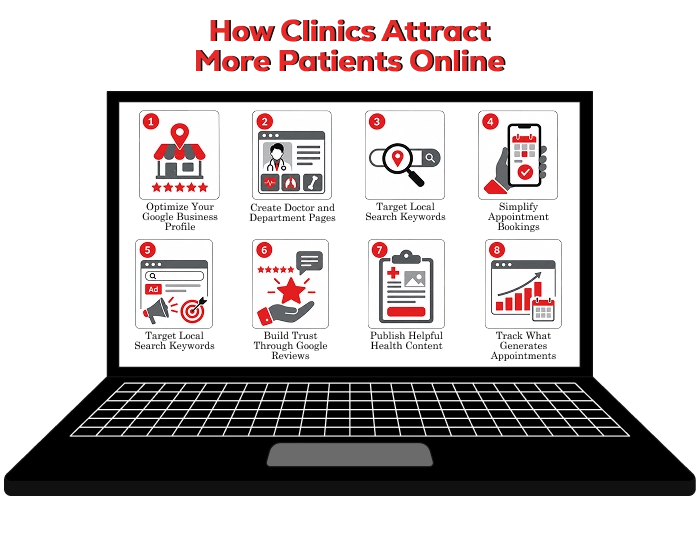
1. Optimize Your Google Business Profile
A hospital’s Google Business Profile is critical when it comes to their visibility locally. They are found in Google Search and Maps results when searching for hospitals, specialists, emergency departments, diagnostics, and even clinics.
Keep the profile complete and updated with:
-
Official hospital name, address, map pin, and phone number
-
Website and direct appointment-booking link
-
Consultation hours, emergency timings, and holiday schedules
-
Relevant hospital and service categories
-
Exterior, reception, department, and facility photos
-
Parking, wheelchair access, pharmacy, insurance, and payment details
If your hospital offers 24/7 emergency services, state this clearly. If only the emergency department operates round the clock, make that distinction visible.
Add a direct booking linkLink patients directly to a mobile-friendly appointment page rather than the homepage. The page should let them select a speciality, doctor, location, date, and preferred time slot with minimal effort.
A smooth booking experience should include:
-
Doctor and speciality selection
-
Available consultation slots
-
Branch or clinic location
-
In-person and teleconsultation options, where available
-
Contact details and booking confirmation
2.Create Doctor and Department Pages
Patients rarely search only for a general hospital. They search for a cardiologist, maternity hospital, knee specialist, dermatologist, MRI centre, or emergency department near them.
Create dedicated pages for:-
Individual doctors
-
Medical departments
-
Treatments and procedures
-
Diagnostic services
-
Hospital branches and clinics
Every doctor page should include qualifications, experience, speciality, conditions treated, consultation timings, hospital location, languages spoken, and a visible booking button.
Department pages should explain the services offered, available specialists, tests or procedures, patient preparation details, and when someone should seek care.
For example, instead of a generic orthopaedics page, create focused pages for knee replacement, sports injury care, arthroscopy, fracture treatment, spine care, and physiotherapy.
3.Target Local Search Keywords
Local SEO helps hospitals appear when patients search for nearby medical care. Use location-focused phrases naturally across your website, such as:
-
“Cardiology hospital in Chennai”
-
“Gynaecologist near Velachery”
-
“Paediatrician near OMR”
-
“Knee replacement specialist in Tambaram”
-
“24-hour emergency hospital near me”
Include these keywords in titles, headings, meta description, doctor biography pages, services, and locations pages as appropriate. Do not use keywords excessively in such a way that it does not make sense.
If hospitals have several branches, then a separate page should be made for each branch containing the branch address, location map, directions, departments provided by that branch, doctor availability, contact number, parking facilities, and booking facility link.
4. Simplify Appointment Bookings
Sometimes a patient gets annoyed with booking appointments, and he leaves your website due to this reason. Make sure that your appointment booking form is short and convenient.
Ask only for essential details:-
Patient name
-
Mobile number
-
Preferred doctor or speciality
-
Preferred branch
-
Preferred consultation date or time
-
Brief reason for visiting
-
Online appointment booking
-
Click-to-call option
-
Callback request form
-
Teleconsultation booking
-
WhatsApp enquiry, if handled securely
-
Walk-in consultation details
Use action-focused calls to action throughout your site. “Book a cardiology consultation,” “Check doctor availability,” and “Request a callback” are clearer than a generic “Contact us.”
5. Use Google Ads for High-Intent Searches
Google Ads can provide instant visibility for competing services, premium services, and new departments as well. The best advertisements always focus on those individuals who actually want to contact the hospital.
Focus on high-intent search terms such as:-
“Book neurologist appointment”
-
“Dermatologist near me”
-
“Emergency hospital open now”
-
“MRI scan near me”
-
“Knee replacement consultation”
-
“Cataract surgery hospital”
-
“Paediatric clinic open today”
Create separate ad groups and landing pages for each department or treatment. Someone searching for a fertility specialist should reach a fertility treatment page, not the hospital homepage.
Use location targeting based on realistic travel distances. For general outpatient care, target nearby neighbourhoods. For advanced procedures or speciality care, expand targeting to regions from which patients commonly travel.
Track completed bookings, appointment forms, calls, callback requests, and teleconsultation enquiries—not only clicks and impressions.
6. Build Trust Through Google Reviews
Reviews strongly influence hospital selection, particularly when patients compare nearby options. A consistent flow of authentic, recent feedback can improve trust and local visibility.
Ask patients for reviews after consultations, diagnostic tests, discharge, or positive service interactions. You can send review requests through SMS, email, reception QR codes, or post-visit feedback messages.
Always request reviews ethically. Do not offer incentives for positive feedback, pressure patients, or publish fake reviews.
Respond to reviews professionally:-
Thank patients for positive feedback without disclosing medical details
-
Acknowledge concerns raised in negative reviews
-
Invite dissatisfied patients to contact the patient-relations team privately
-
Avoid arguing or discussing personal health information publicly
7. Publish Helpful Health Content
Educational content helps hospitals attract patients who are researching symptoms, conditions, tests, or treatments before they are ready to book.
Useful topics include:-
When to see a cardiologist
-
Early warning signs of stroke
-
What to expect during an MRI scan
-
Normal delivery versus C-section
-
When knee pain needs orthopaedic care
-
Diabetes symptoms and testing
-
Child fever: when to visit a paediatrician
-
Cataract surgery recovery
-
Health check-ups by age group
Each blog must lead the reader to a relevant next step. In an example where an article talks about migraines that come back again and again, the call to action will be to consult a neurologist.
Any healthcare-related writing must be medically reviewed and accurate, up to date, and easy to understand by patients. Do not make unverifiable claims like “guaranteed cure” or “100% successful.”
8. Track What Generates Appointments
Measure whether Google activity creates real appointments, not just website visits.
| Metric | What it shows |
|---|---|
| Google Business Profile calls | Local patients contacting the hospital directly |
| Direction requests | Patients considering a visit to the facility |
| Online bookings | Completed appointment actions |
| Click-to-call activity | Demand from patients who prefer phone booking |
| Form submissions | Appointment enquiries from the website |
| Cost per lead | Google Ads efficiency |
| Lead-to-booking rate | How many enquiries become confirmed appointments |
| No-show rate | Appointment quality and patient follow-through |
| Department-wise bookings | Services generating the highest demand |
Connect Google Ads, website analytics, call tracking, booking forms, and CRM or hospital management data wherever possible. This helps identify which channels and keywords drive actual consultations.
Boost Hospital Appointment Bookings With Xcodefix
Getting more hospital appointments from Google starts with being easy to find and easy to trust. A strong Google Business Profile, useful doctor and treatment pages, local SEO, simple appointment booking, and genuine patient reviews can help your hospital reach more people who are actively looking for healthcare services.
At Xcodefix, we help healthcare facilities improve their Google visibility and turn online searches into patient enquiries and appointments. As a trusted SEO agency for healthcare facilities, we focus on strategies that help patients find the right services, doctors, and treatments when they are ready to take action. See how our healthcare SEO strategies have helped hospitals and healthcare facilities improve their online visibility and attract more patient enquiries. View our healthcare clients to see how we help healthcare businesses grow through SEO.