
What Orphan Pages Are and Why Google Often Ignores Them
In terms of the strength of online presence, all of the pages on your site must contribute to the navigation of the users to the content and to the search engine to ensure that everything works easily. Nevertheless, that is not the case with all pages, at least not when they have no internal links referring to them. They are referred to as orphan pages. They may not appear harmful initially, but they can gradually destroy all your SEO activities. Orphan pages make it difficult to crawl and index the information on them by search engines, so that they are still not visible in the search. Because of this, you can end up losing traffic and power on your site without even realizing that it is happening. Through this blog, you are going to get to know what orphan pages are, their impact on your ranking, and effective procedures you can go through to identify them in order to correct them.
Orphan Pages in SEO & How They Affect Site Crawlability
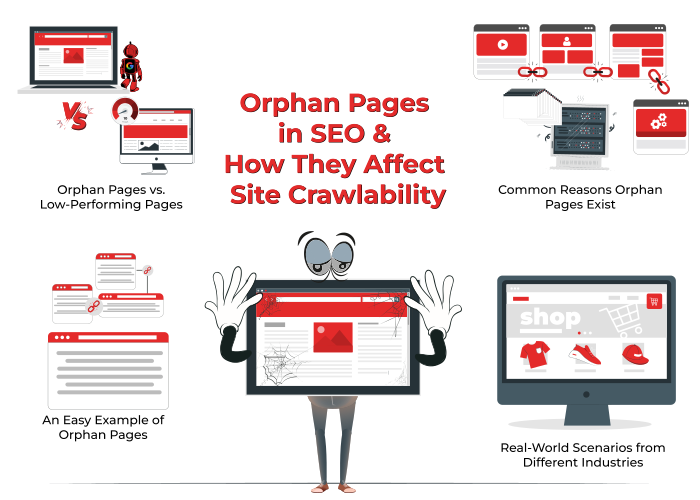
An Easy Example of Orphan Pages
The orphan pages are web pages that exist in your site; they are live, but they are not linked up by any internal links. They are placed out of your primary navigation and can only be discovered through having the precise URL. These pages are not linked with other areas of your website, and as such, search engines tend to miss them in crawling. As an example, in consideration of a blog, you may post a new article in your blog but fail to create a reference to it in your homepage, blog index, or category list; then that particular web page would be an orphan page. What it contains might be a great thing, but unless it is linked, it will not contribute traffic, nor will it feature in search results.
Orphan Pages vs. Low-Performing Pages
Orphan pages can be confused with low-performing pages, but these two are not the same thing. A poor-performing page can appear in the backlink of various locations, yet even so, it does not rank high since the content could be poor, poorly aged, or simply miss the intent of the user. However, orphan pages can contain excellent content that is lost since they are not linked to anywhere. The question here is not of the quality of content but of visibility and connectivity within your site.
Common Reasons Orphan Pages Exist
Orphan pages usually appear due to missed steps in planning or managing content. One major reason is site restructuring. During design changes or layout updates, links to older pages may get removed, leaving those pages disconnected. Poor internal linking is another common reason. Teams may publish new pages without adding links from menus, blogs, or service sections. Technical issues can also cause orphan pages. Errors in your sitemap, plugin failures, or wrong settings in your robots file can prevent pages from being crawled.
Many content management systems allow content to be published directly, but if the team does not include it in the main flow, it never gets seen. This often happens when content and SEO teams do not follow a shared process for linking and structure.
Real-World Scenarios from Different Industries
Orphan pages are a problem across all types of websites. In e-commerce, a product page may go live but may not appear in any category if someone forgets to assign it. In blogs or news portals, a post might be published without being added to any tag or topic page. In service-based businesses, new location or seasonal offer pages may be left out of menus or footers, making them hard to find.
Even enterprise websites and government portals face this issue when large teams work on different parts of a site without a central linking strategy. No matter the industry, the result is always the same. The page remains invisible to search engines, brings no traffic, and weakens the overall SEO structure of the website.
The Problem With Orphan Pages & Their SEO Impact
Indexing & Crawling Problems
Orphan pages lack internal links, so search engines like Google often fail to crawl or index them.
Even valuable content remains hidden from both search engines and users if it is not connected to the main site structure.
Diluted Link Equity (Authority Dilution)
-
Internal links help distribute link equity or authority across your website.
-
Orphan pages interrupt this flow, isolating valuable content and reducing its ranking potential.
Poor User Experience and Higher Bounce Rate
-
Orphan pages are not included in navigation or linked naturally, making them hard for users to find.
-
If users land on them, they often hit a dead end and leave quickly, which raises your bounce rate and reduces engagement.
How to Identify Orphan Pages on Your Website
Finding orphan pages is a crucial part of regular SEO maintenance. These pages are not linked from anywhere on your site, so you need to take a structured approach to uncover them. Below is a simple way to find orphan pages using trusted tools and techniques.
Popular Tools to Identify Orphan Pages
You can use one or more of the following tools to perform a full scan of your website and compare different data sources:
-
Google Search Console: Shows pages indexed by Google, even if they are not linked internally.
-
Screaming Frog SEO Spider: A powerful crawler that scans your site and compares your internal link structure with your XML sitemap and Google Analytics.
-
Ahrefs Site Audit: Highlights orphan pages that have backlinks but no internal links.
-
Sitebulb: Offers visual graphs and highlights isolated pages that are not linked from other internal sources.
-
Google Analytics, or GA4: Tracks user visits to pages that may not be part of your internal linking flow.
Step-by-Step Method to Identify Orphan Pages
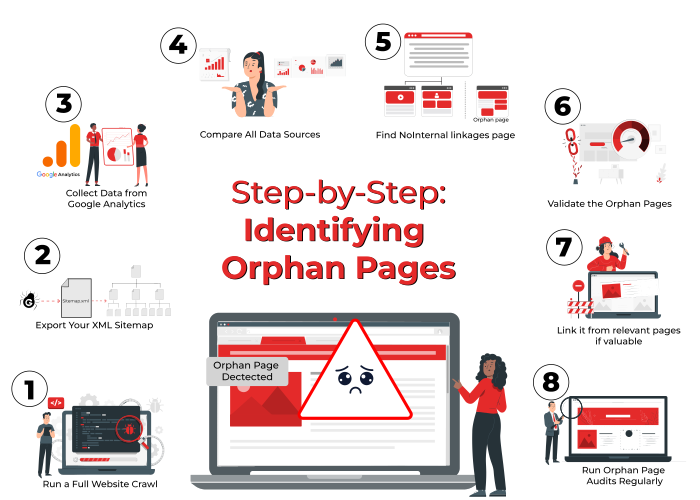
To identify orphan pages accurately, follow this simple yet effective method:
Run a Full Website Crawl
Use a crawler like Screaming Frog or Sitebulb to scan all internal pages that are linked from your navigation, menus, and content.
Export Your XML Sitemap
Download your XML sitemap to get a list of all the pages you expect search engines to crawl.
Collect Data from Google Analytics
Export a list of all pages that received traffic in the last three to six months. This helps you find pages users have accessed, even if they are not linked.
Compare All Data Sources
Use a spreadsheet to compare:
-
Pages crawled internally
Pages listed in the sitemap
Pages with real user visits from Analytics
-
Pages indexed in Google Search Console.
Find NoInternal linkages page
Orphan pages are identified by the pages that are shown on Analytics or Search Console but not on your crawler report.
Validate the Orphan Pages
Manually inspect each orphan page:
-
Confirm it exists and loads correctly.
Check if it has zero internal links pointing to it.
Evaluate the page’s content value and purpose
Take Action Based on Relevance
Decide what to do with each page:
-
Link it from relevant pages if valuable.
Merge similar content into one strong page.
Redirect outdated pages to relevant alternatives.
Remove the page entirely if it serves no purpose.
Run Orphan Page Audits Regularly
Doing this audit monthly or quarterly will improve your site’s SEO, boost internal linking structure, and help search engines better understand your website hierarchy.
Best Practices to Fix Orphan Pages & Boost SEO
After you recognize orphan pages on your website, the second step is to take action. Not every orphan page must remain live. The thing is, you should understand which ones are worth keeping and which aren't. Some best practices to repair them are as follows:
Apply Smart Internal Linking Strategies
-
Add links from corresponding blog posts, service pages, or product pages.
Use natural anchor text that is organic to the content.
Develop category or tag pages for aggregating similar content and linking to them.
Add Pages to Navigation or Sitemap
-
Link key pages if they are significant in the primary menu, footer, or sidebar.
-
Place all high-value pages on your XML sitemap.
-
Submit the sitemap in Google Search Console to accelerate crawling.
Combine or Redirect Low-Value Orphan Pages
-
If there are two pages covering the same thing, merge the content into one and perform a 301 redirect.
-
If the page is obsolete or no longer has any use, point it to a similar page or delete it if necessary.
-
Don't have multiple pages competing for the same keyword or intent.
When to Delete or Refresh Web Content for SEO Gains
-
Make sure the orphan page has high-value content but bad structure.
-
Revise it with new content, improved formatting, and internal linking.
-
These are optional, but if it holds no value, then remove it to make your site clean.
Preventing Orphan Pages in the Future
It is necessary to treat orphan pages, but avoiding them initially could be better. Implement these suggestions to maintain your site well-linked and SEO-optimized for the long run.
Design a Clear & Scalable Site Structure
-
Establish a hierarchy where every page is part of a category or subcategory.
-
Use breadcrumbs or internal menus to connect related pages.
-
Avoid deep pages that have more than three clicks.
Run Periodic SEO Audits
-
Use crawling tools on a monthly or quarterly basis to crawl for broken links, unlinked pages, and crawl issues.
-
Cross-reference analytics and sitemap data to catch the gaps early.
-
Watch out for changes when websites are being updated or migrated.
Incorporate SEO in Content & Dev Workflows
-
Internal linking should be included in the pre-publication checklist of new content.
-
Make sure the dev team ensures navigation or sitemaps are refreshed when new pages are created.
-
Configure auto-notifications of new unlinked or uncrawled pages.
Identify & Fix Orphan Pages to Improve Website Rankings
Orphan pages are web pages that exist on a website but have no internal links pointing to them. This means visitors and search engines cannot find them through normal navigation. As a result, they are often ignored by search engine crawlers and do not appear in search results. Orphan pages reduce the overall SEO value of a site because they are disconnected from the internal link structure.
As the best seo company in Coimbatore at Xcodefix, we help identify and fix orphan pages to improve site visibility and search rankings. Our team ensures that all valuable content is properly linked so that both users and search engines can easily access it.